

Appearance

Horilla Navigation View (HNV)
HorillaNavView is a Django TemplateView class that enables the creation of a navigation-based interface with search, filtering, grouping, and actions, all with caching support.
Class Attributes
| Attribute | Type | Description |
|---|---|---|
| nav_title | str | Title displayed in the navigation bar. |
| template_name | str | Template used for rendering the view. Default is "generic/horilla_nav.html". |
| search_url | str | URL to which search requests are sent. |
| search_swap_target | str | Target element ID for displaying search results. |
| search_input_attrs | str | HTML attributes for the search input field, allowing customization such as placeholders or classes. |
| search_in | list | List defining search categories or fields to search within. |
| actions | list | List of action configurations. Each action can have attributes like name, icon, URL, and method for executing the action. |
| group_by_fields | list | List of fields by which the view can group results. |
| filter_form_context_name | str | Context name for the filter form object, used to reference it within the template. |
| filter_instance | FilterSet | An instance of FilterSet to apply filtering on the view’s queryset. |
| filter_instance_context_name | str | Context name for referencing the filter instance in the filter_body_template. |
| filter_body_template | str | Path to a template for rendering the filter body, allowing custom filter UI layouts. |
| view_types | list | List of different view types supported, such as list or card views, etc. |
| create_attrs | str | HTML attributes for the "Create" button, enabling customization like classes or IDs. |
Usage Example
Here’s how to use HNV in Horilla:
python
from horilla_views.generic.cbv.views import HorillaNavView
from django.urls import reverse_lazy

class EmployeeNavView(HorillaNavView):
    """
    EmployeeNavView
    """

    nav_title = "Employees"
    search_url = reverse_lazy("employee-tab-view")
    #path to your view where search/filter submited
    search_swap_target = "#tabContainer" # cbv-employee-list view's view_id
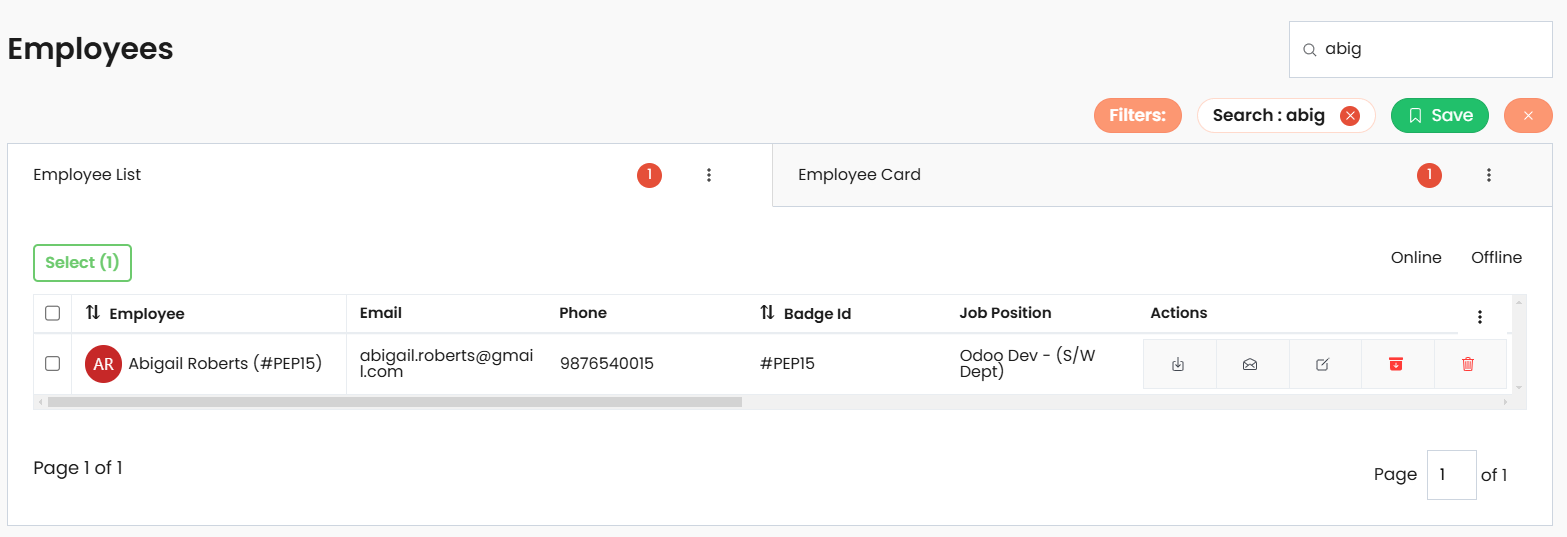
Example Output for HNV
View Types
View types is the attribute for the hnv that helps to include multiple views in the navbar. Using the feature can be configured the views like list, card or any other views instead of htv.
python
view_types = [
    {
        "type": "list",
        "icon": "list-outline", # ionicons icon name
        "url": reverse_lazy("hlv"), # path/url to the view
    },
    {
        "type": "card",
        "icon": "grid-outline", # ionicons icon name
        "url": reverse_lazy("hcv"), # path/url to the view
    },
]
Group By Fields
HNV provides dropdown to select the group by fields for the list views. Using the group_by_fields all the fields are listed in a drop down feature in the nav view. Supported related field grouping.
python
group_by_fields = [
    ...
    ("employee_work_info__department_id", "Department"),
    ...
]
Actions
Actions is HNV is also a drop down that indicates or list out all the bulk actions. You can add the attributes in the attr that complete or support the action.
python
actions = [
    {
        "action": "Import",
        # "attrs": "", # attrs to support the action
        # "accessibility": "", # accessibility method mapping
    },
    {
        "action": "Export",
        # "attrs": "", # attrs to support the action
        # "accessibility": "", # accessibility method mapping
    },

]
Filter Body Template
The filter_body_template is the template for the filter form. The form filter_form_context_name option is used to mention the form context name that is used in the filter_body_template.
python
filter_body_template = "employee_filters.html"
filter_form_context_name = "filter_form"
The custom filter body template
html
<!-- templates/employee_filters.html -->
{{filter_form}}
Key Features
Customizable Navigation Title
Thenav_titleattribute allows setting a title for the navigation bar, enabling a personalized and descriptive heading.Search
Supports search functionality with customizablesearch_url,search_swap_target,search_input_attrs, andsearch_in, allowing for precise and flexible search configurations.Grouping and Filtering Options
Users can group and filter data based on specified fields (group_by_fields) and aFilterSetinstance (filter_instance), enhancing data organization and user experience.Flexible Action Management
Theactionsattribute enables defining action buttons or dropdown within the navigation viewMultiple View Types
Allows switching between multiple view formats, such as list or grid views, giving users flexibility in how data is presented.Custom Filter Layout
Thefilter_body_templateallows using a custom template for the filter section, enabling unique layouts and complex filter designs.