

Appearance
Horilla Tab View (HTV)
HorillaTabView is a Django TemplateView class designed to manage a tabbed interface with support for caching, dynamic tabs, and user-specific tab tracking.
Class Attributes
| Attribute | Type | Description |
|---|---|---|
| view_id | str | Unique identifier for the view, generated using get_short_uuid. Default prefix is "htv". |
| template_name | str | Template used to render the view. Default is "generic/horilla_tabs.html". |
| tabs | list | List of tab configurations. Each tab can be customized with attributes such as name, target, and order. |
Usage Example
Here’s how to use HTV in Horilla:
python
from horilla_views.generic.cbv.views import HorillaTabView
from django.urls import reverse_lazy


class EmployeeTabView(HorillaTabView):
    """
    EmployeeTabView
    """
    view_id = "tabContainer"
    tabs = [
        {
            "title": "Employee List",
            "url": reverse_lazy("cbv-employee-list"),  # path to your view
            "badge_label" : "Employees", # default is records
            "actions": {
                "action":"Add",
                # "accessibility":"path_to.your.accessibility_method",
                # "attrs":"",
            }
        },
        {
            "title": "Employee Card",
            "url": reverse_lazy("cbv-employee-card"),
            "actions": {
                "action":"Add",
            }
        },
    ]
Example Output for HTV
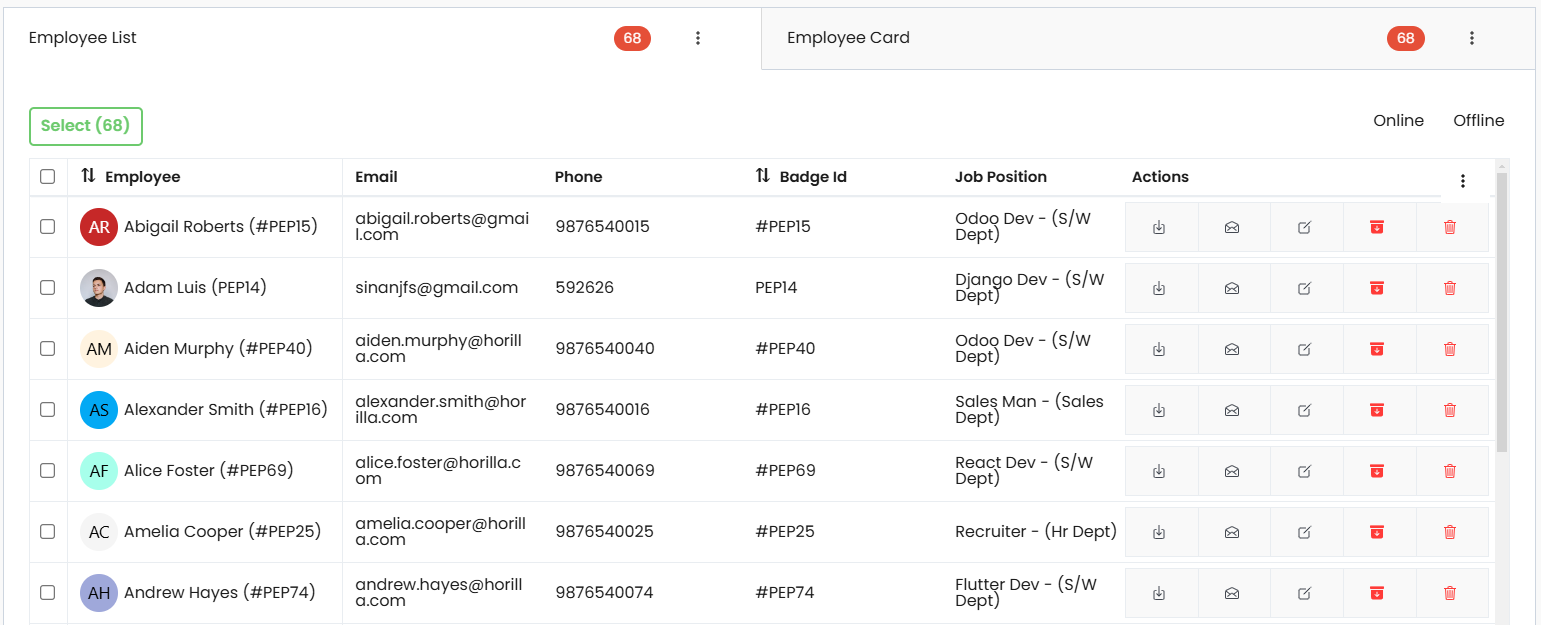
Tab Content Caching
To cache tab-specific content for efficient loading, HorillaTabView utilizes session-based caching. The cache stores the context based on the user's session key, ensuring personalized tab states.
User-Specific Active Tab Tracking
HorillaTabView supports tracking the last active tab for a user, so when a user revisits the view, the previously active tab is restored. This behavior relies on the ActiveTab model, which records the active tab for each user and view path.
Key Features
Dynamic Tab Management Define multiple tabs with customizable attributes, including title, target URL, badges label, and actions.
Action Support within Tabs Each tab can include actions, enabling quick operations (e.g., adding new records) specific to the tab's content. Actions are customizable with labels and accessibility paths.
Badge Labeling Tabs can display dynamic badges for indicators like item counts, providing real-time context and helping users quickly assess tab contents.
User-Specific Tab Persistence Automatically tracks the user’s last active tab, so each user returns to their preferred tab when revisiting the view. This is managed through the ActiveTab model.
Efficient Content Caching Leverages session-based caching to store each user’s tab states and content. This improves loading times and enhances performance, particularly for content-heavy tabs.
Customizable Unique View Identifier Generates a unique view_id for each instance, allowing for easier identification of specific tab instances and custom behaviors in complex applications.
Configurable Template The template_name attribute points to a default template but can be customized to meet specific design requirements for each instance.