

Appearance
Interview Management
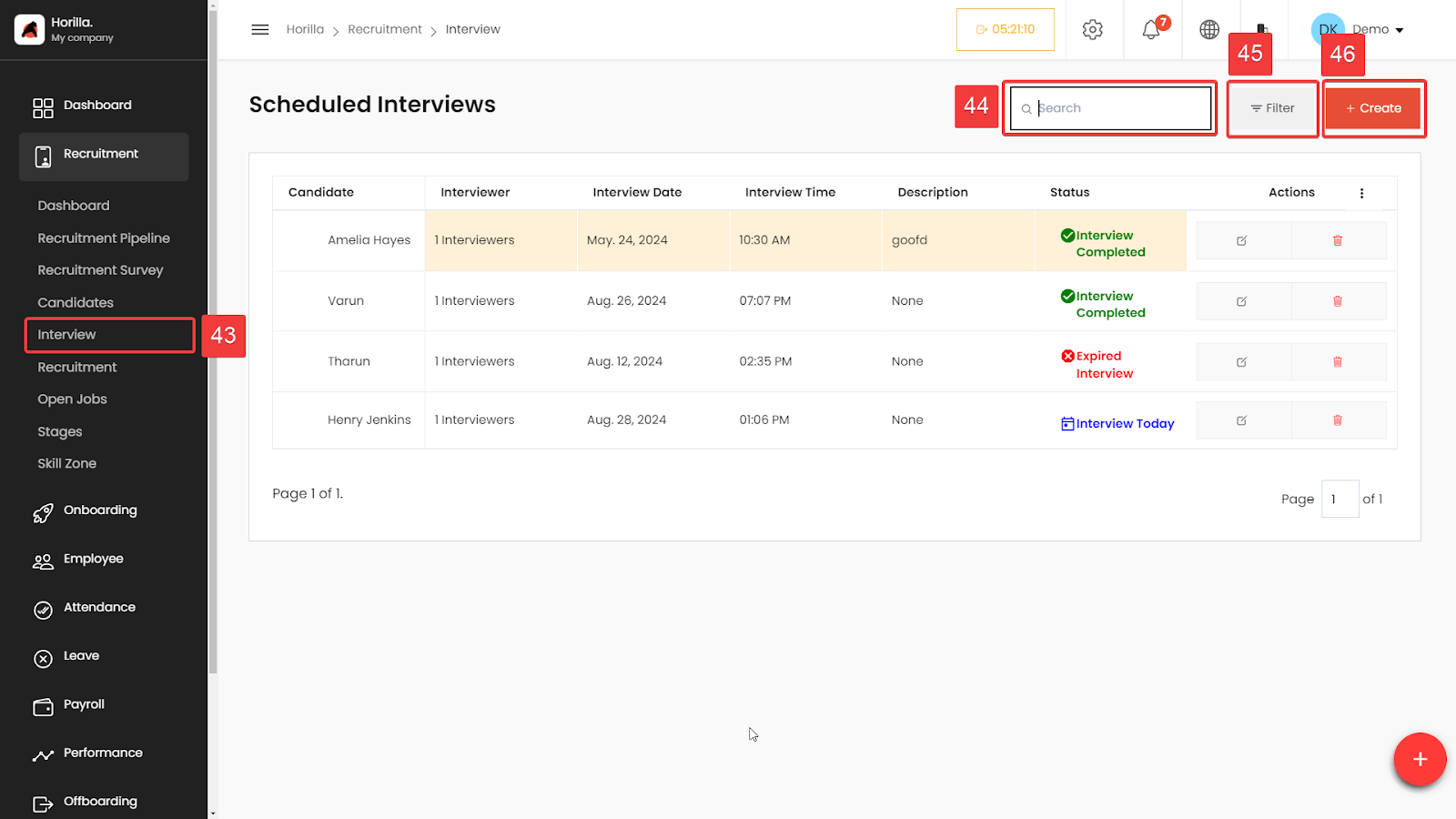
The Interview Schedule feature allows users to efficiently manage and keep track of interviews within the recruitment process. To access the feature On the left-hand side menu under the "Recruitment" section, click on Interview (marked as 43). This will bring you to the "Scheduled Interviews" page.
Scheduled Interviews List: The main section displays a list of scheduled interviews, providing a clear overview of all upcoming and past interviews.
Candidate: The name of the candidate scheduled for the interview.
Interviewer: Number of interviewers assigned.
Interview Date: The date when the interview is scheduled.
Interview Time: The time the interview is set to begin.
Description: Any additional notes or comments regarding the interview.
Status: The current status of the interview, such as:
Interview Completed (marked with a green checkmark)
Expired Interview (marked with a red cross)
Interview Today (marked with a blue calendar icon)
Actions Group: Each scheduled interview has associated action icons under the "Actions" column:
Edit (pencil icon): Allows you to modify the details of the interview.
Delete (trash bin icon): Enables you to remove the interview from the schedule.
Search (Marked as 44): The search bar at the top allows you to quickly find specific interviews by typing in the candidate’s name, interviewer, or any other related keyword.
Filter (Marked as 45): The filter option helps in narrowing down the list based on specific criteria such as date, status, or interviewers, making it easier to manage a large number of scheduled interviews.
Create (Marked as 46):To schedule a new interview, click on the Create button. This opens a form where you can enter the candidate’s name, assign interviewers, set the date and time, and add any relevant notes or descriptions.