

Appearance
Settings
Introduction
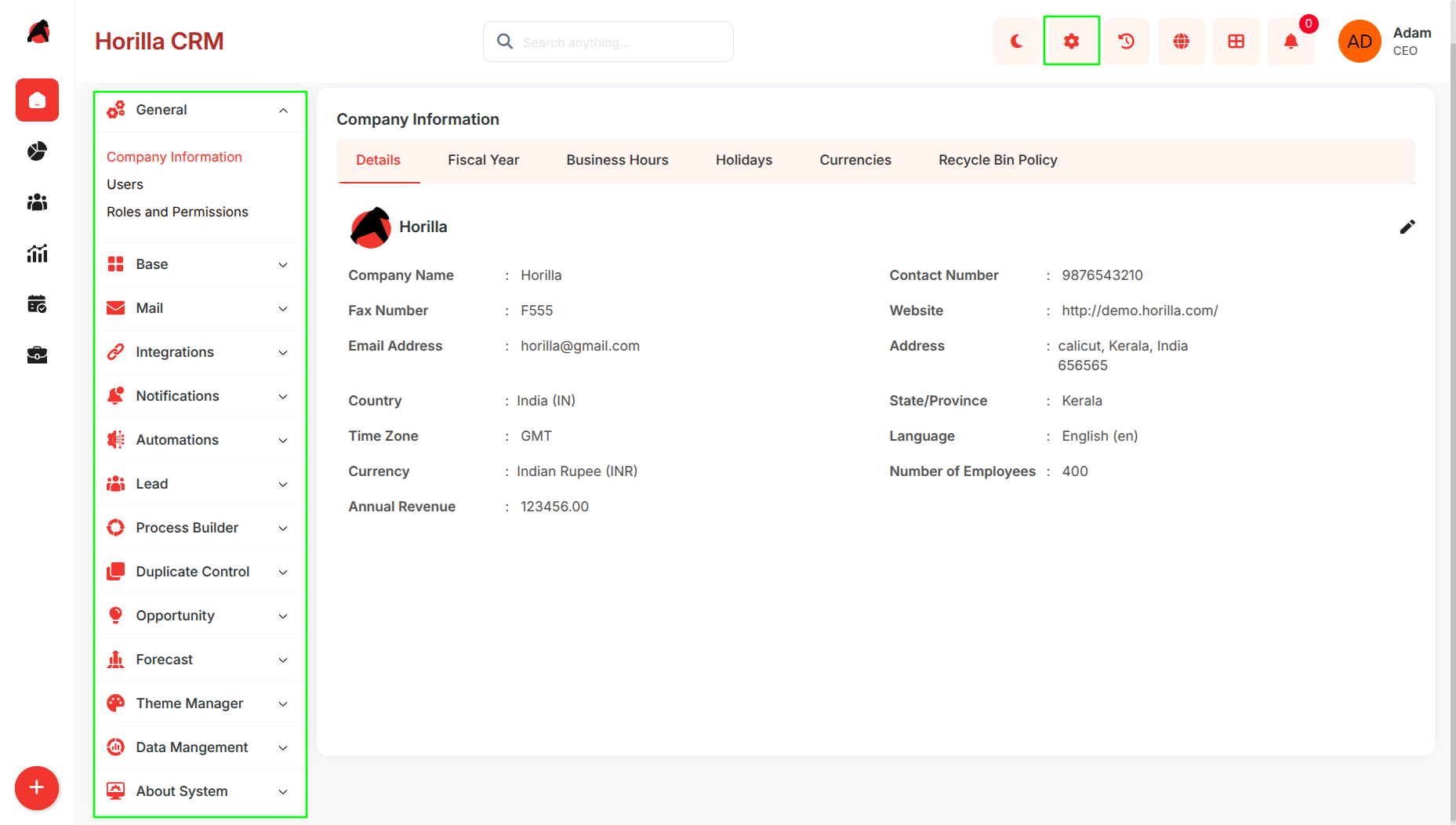
The Horilla CRM Settings Section is the administrative hub for system-wide configuration, user management, and organizational structure. It enables administrators to configure company details, manage users and access control, establish operational hierarchies, and maintain data governance across the entire CRM platform.
Key Features and Functionalities
General Settings
Purpose: Configure core organizational information and system-wide policies.
Access: Settings → GeneralKey Features:
.Company Information: Organization details, fiscal year, business hours, holidays, currencies, data retention
Users: User management, creation, profiles, login history
Roles and Permissions: Role-based access control, user permissions, Super User management.
Base Settings
Purpose: Establish organizational structure and business rules.
Access: Settings → Base
Key Features:Department Management : Define organizational departments
Branches (Companies) : Manage multiple business units with automated stage setup
Scoring Rules : Create point-based lead/opportunity qualification
Roles : Team Role, Customer Role, Partner Role definitions
Mail Settings
Purpose: Configure email integration and communication channels.
Access: Settings → Mail
Key Features:Outgoing Mail Server : SMTP/relay configuration for outbound email
Incoming Mail Server : MAP/POP configuration for inbound email
Mail Template : Manage reusable email templates
Integrations Settings
Purpose: Connect Horilla CRM with external services.
Access: Settings → Integrations
Key Features:Google Calendar Sync: Enable and configure two-way sync of CRM activities with Google Calendar (visible only when Google integration is enabled)
Notifications Settings
Purpose: Manage reusable notification content for system alerts.
Access: Settings → Notifications
Key Features:Notification Templates: Create and manage templates used by automations and system triggers
Automations Settings
Purpose: Configure system-wide automation rules and multi-step outreach sequences.
Access: Settings → Automations
Key Features:Mail & Notifications: Create trigger-based automation rules that send emails or push notifications on CRM events (e.g., lead assigned, stage changed)
Cadences: Build multi-step outreach sequences (e.g., email day 1 → call day 3 → follow-up day 7) that run automatically against leads, contacts, or opportunities
Lead Settings
Purpose: Configure lead management pipeline.
Access: Settings → Lead
Key Features:Lead Stage: Define pipeline stages with probability and final stage enforcement
Web to Lead : Embed lead capture forms on external websites
Mail to Lead : Auto-create leads from incoming email (requires Incoming Mail config)
Process Builder Settings
Purpose: Define structured workflows for approvals and reviews across the CRM.
Access: Settings → Process Builder
Key Features:Review Processes: Configure multi-step review workflows (e.g., deal review, record sign-off) that route records through defined reviewers in sequence
Approval Processes: Define approval rules and chains for actions that require managerial or team sign-off before proceeding
Duplicate Control Settings
Purpose: Prevent and manage duplicate records across the CRM.
Access: Settings → Duplicate Control
Key Features:Matching Rules: Define field-level rules for identifying potential duplicates
Duplicate Rules: Set threshold and merge policies based on matching rule scores
Opportunity Settings
Purpose: Configure opportunity management and deal monitoring.
Access: Settings → Opportunity
Key Features:Opportunity Stage: Define sales pipeline stages with Open/Closed classification
Opportunity Team Settings: Enable and configure team selling mode
Opportunity Split Settings: Configure split-commission types (visible only when team selling is enabled)
Big Deal Alert: Configure high-value opportunity notifications
Forecast Settings
Purpose: Configure forecasting parameters.
Access: Settings → Forecast
Key Features:Forecast Type: Define forecast categories (e.g., Best Case, Committed, Pipeline)
Forecast Target: Set revenue targets per user, team, or period
Theme Settings
Purpose: Customize the visual appearance of the CRM.
Access: Settings → Theme
Key Features:Color Themes: Create and apply custom color themes across the entire CRM interface
Data Management
Purpose: Manage data migration, export, and retention.
Access: Settings → Data Management
Key Features:Import Data: Bulk migration with field mapping (CSV, XLS, XLSX)
Export Data: Bulk export of CRM records to CSV/Excel
Recycle Bin: Manage soft-deleted records with restore or permanent delete options
About System
Purpose: View system metadata and version information.
Access: Settings → About System
Key Features:Version Info: Displays the current Horilla CRM version and system build details